Export Dashboard
Overview
The Export dashboard provides raw data that you can download in .csv, .xlsx, or .json format for further analysis. Data can be filtered before export.
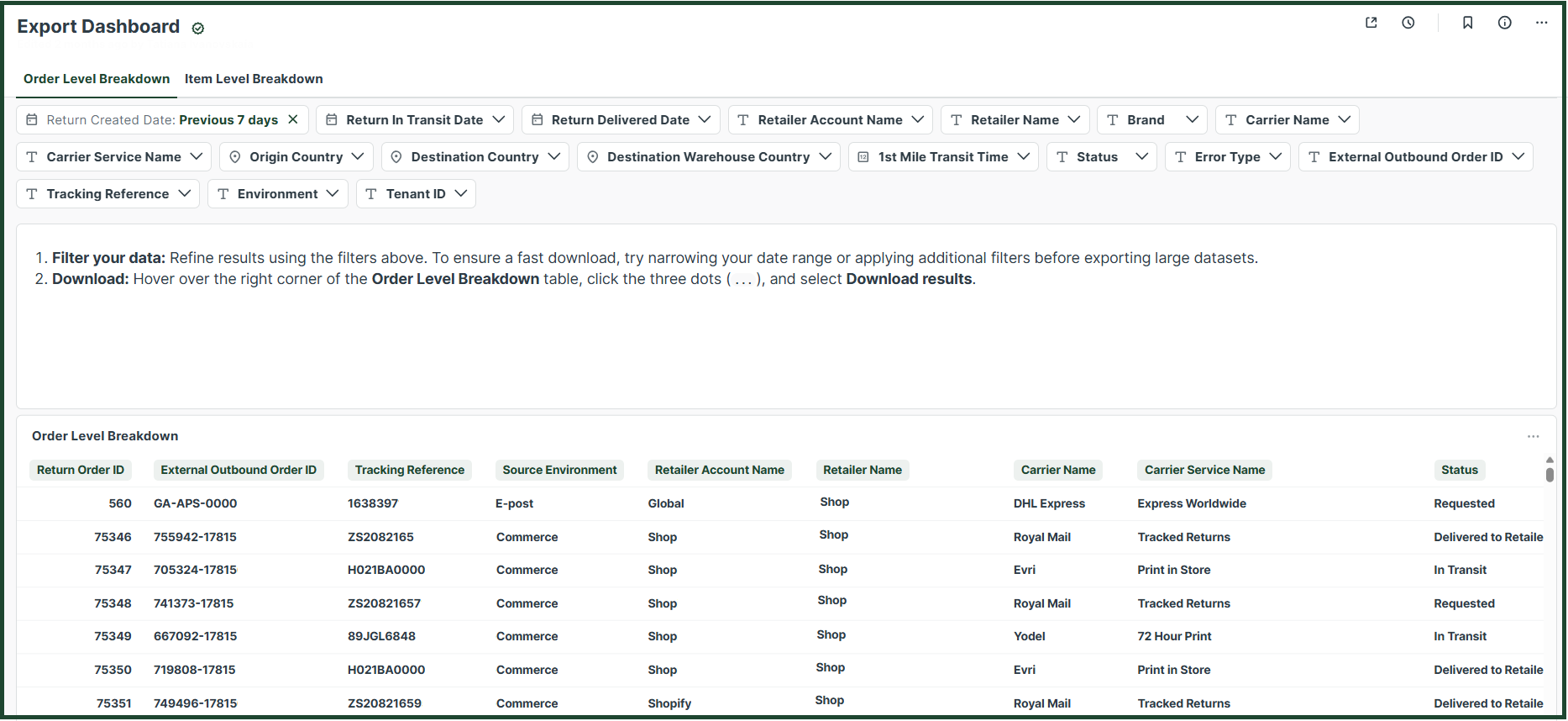
Views
The Export Dashboard includes two views:
- Order Level Breakdown – data is provided at the order level
- Item Level Breakdown – data is provided at the item level
Click the headers to switch between the two views.

Result column descriptions
Order Level View Columns
- Return Order ID - The ID number of a return order.
- External Outbound Order ID - The ID number of an outbound order.
- Tracking Reference - The return's tracking reference .
- Source Environment - The retailers environment (either ZZ-Live, TVG-Live or White Label).
- Retailer Account - For retailers that are part of a larger group that utilizes ZigZag's services.
- Retailer Name - In case you have access to multiple retailer's data, this filter allows you to select the specific retailer you would like to see data for.
- Carrier Name - Name of the carrier used to ship the orders.
- Carrier Service Name - Name of the carrier service selected to ship to orders.
- Status - Journey status of orders, i.e. In transit, Delivered to retailer, etc.
- Origin Country - Filters based on the return order origin country, i.e. the country from which the end consumers are sending their returns.
- Destination Country - Final destination country where the order is returned.
- Receiving Warehouse Country - Country of the middle stop warehouse name when the order has a multi-leg journey.
- Day of Return Created - The date when the return was created.
- Day of Return In Transit - The date when the return started the journey and is in transit.
- Day of Return Received - The date when the return status is changed to Received, after it has been delivered to the receiving warehouse.
- Day of Return Checked In - The date when the return was checked in at the receiving warehouse.
- Day of Return Despatched to Retailer - The date when the returns changed status to Despatched to retailer.
- Day of Return Delivered to Retailer - The date when the return has been delivered to the retailer.
- Day of Return Delivered to Sender - The date when the return was delivered back to the sender (the person who requested the return) because the carrier was unable to deliver it to the final retailer. This may occur due to missing information or an issue during the return journey.
- 1st Mile Transit Time - The number of days it takes for an order to go from In transit status to being Delivered to the retailer.
- Label Costs (GBP) - The total number of label costs of carriers from the return journey.
- Return Costs (GBP) - The cost of a returned order in GBP that the customer pays for the return journey.
- Refund Deduction Fee (GBP) - The cost of fee that was deducted from the total price of the order as a return cost .
Item Level View Columns
- Return Order Item ID - The ID number of a return order item.
- External Order ID - The ID number of an outbound order.
- Return Order ID - The ID number of a return order.
- Tracking Reference - The return's tracking reference.
- Source Environment - The retailers environment.
- Retailer Account - For retailers that are part of a larger group that utilizes ZigZag's services.
- Retailer Name - In case you have access to multiple retailer's data, this filter allows you to select the specific retailer you would like to see data for.
- Carrier Name - Name of the carrier used to ship the orders.
- Carrier Service Name - Name of the carrier service selected to ship orders.
- Brand - Name of the retailer's brand(s).
- Origin Country - Return order origin country, i.e. the country from which the end consumers are sending their returns.
- Destination Country - Final destination country where the order is returned.
- Receiving Warehouse - Middle stop warehouse name when the return order has a multi-leg journey.
- Destination Warehouse - Final warehouse name where the order is returned.
- Receiving Warehouse Country - Country of the middle stop warehouse when the order has a multi-leg journey.
- Destination Warehouse Country - Country of the final stop warehouse when the order has a multi-leg journey.
- Customer Postcode - Return order origin postcode, i.e. the postcode from which the end consumers are sending their returns.
- Destination Postcode - Final destination postcode where the order is returned.
- Return Reason - Free text field where customer describes the return reason.
- Return Reason Group - Return reason grouping.
- Return Reason Category - Categories grouping the Return Reason Groups.
- Return Reason Avoidability - Classifies return reasons into avoidable or unavoidable .
- Secondary Return Reason - Free text field for Secondary Return Reasons.
- Product Name - The name of the returned product.
- Product SKU - A stock-keeping unit, or SKU, is a unique code that a seller assigns to every type of item it sells.
- Product Category - Category of the item. Categories are specified from the retailers.
- Product Country of Origin ID - The ID of the product's origin country.
- Return Type - Classifies the return order into either return, repair, refund, exchange, mobile B2B or unintended return.
- Faulty Flag - Flags whether the return has one or more errors.
- Paid Return - Classifies returns as Free or Paid.
- Status - The status of the return.
- Day of Return Created - The date when the return was created.
- Day of Return In Transit - The date when the return started the journey and is in transit.
- Day of Return Received - The date when the return status is changed to Received, after it has been delivered to the receiving warehouse.
- Day of Return Checked In - The date when the return was checked in at the receiving warehouse.
- Day of Return Despatched to Retailer - The date when the return changed status to Despatched to retailer.
- Day of Return Delivered to Retailer - The date when the return has been delivered to the retailer.
- Return Item Weight (Kg) - Weight of the item in Kg.
- Default Prod HS Code - Default code for returned items that are exported.
- HS Code - When both the import and export HS codes are empty.
- Day of Return Delivered to Sender - The date when the return was delivered back to the sender (the person who requested the return) because the carrier was unable to deliver it to the final retailer. This may occur due to missing information or an issue during the return journey.
- 1st Mile Transit Time - The number of days it takes for a return order to go from In transit status to being Delivered to the retailer.
- Requested to In Transit - The number of days it takes for a return order to go from Requested status to In transit.
- HS Code Error - Indicates whether HS Code information is available. The field displays "Error" if the information is missing and "No Error" if the information is present.
- Return Price Error - Indicates whether Return Price information is available. The field displays "Error" if the information is missing and "No Error" if the information is present.
- Return Item Weight Error - Indicates whether Return Item Weight information is available. The field displays "Error" if the information is missing and "No Error" if the information is present.
- Product Origin Country ID Error - Indicates whether Product Origin Country ID information is available. The field displays "Error" if the information is missing and "No Error" if the information is present.
- Return Price (Original Currency) - The price of the return for the customer in the return's original currency (check).
- Return Costs (GBP) - The cost of the returned order in GBP that the customer pays for the return journey.
- Refund Deduction Fee (GBP) - The cost of fee that was deducted from the total price of the order as a return cost.
- Label Costs (GBP) - The total value of carrier label costs for the return journey.
- Gross Returns Revenue (GBP) - The total gross revenue received from each item.
Filters
The available filters enable you to customise the data displayed in the dashboards based on specific criteria.

Date filters
-
Return Created Date - Filters data based on when the return was created.
-
Return In Transit Date - Filters data based on when the return was marked as in transit.
-
Return Delivered Date - Filters data based on when the return was delivered.
NoteDate filters can be used individually or together.
When applying multiple date filters at the same time, ensure the selected date ranges are compatible.
For example, choosing very different date ranges for “Return Created Date” and “Return In Transit Date” may result in no data being returned.
Retailer Filters
- Retailer Account - Use this when retailers belong to a larger group using ZigZag’s services.
- Retailer Name - If you have access to multiple retailers, use this filter to select a specific retailer.
Shipping Filters
- Carrier Name - The carrier used to ship the return.
- Carrier Service Name - The specific carrier service used for shipping.
Location Filters
- Origin Country - The country from which the return is sent by the end customer.
- Destination Country - The final country where the return is delivered.
- Destination Warehouse Country - The country of the final warehouse in multi-leg journeys.
Performance Filter
- 1st Transit Time - The number of days:
- From in transit to delivered to retailer (single-leg journeys), or
- From in transit to delivered to the first warehouse (multi-leg journeys).
Error Filters
- Error Type - Filters data for returns that have one or more of the following errors: HS Code Error, Return Price Error, Return Item Weight Error and/or Product Origin Country ID Error. (This filter is only available on the Item Level Breakdown view.)
ID Filters
- External Outbound Order ID - Filters data based on specific External Outbound Order IDs (works as a search box).
- Tracking Reference - Filters data based on specific Tracking References (works as a search box).
Environment Filter
- Environment - Filters data by retailer environment.